

premium ULTIMATE
API Authentication
Most API endpoints of qibb are private and can only be called by authenticated service accounts or users.
Custom platform domains
The URL examples given on this page use multi-tenant SaaS environments hosted on the qibb.com domain. However, depending on the subscription tier and delivery model (multi-tenant SaaS, single-tenant SaaS, or PaaS), your platform is hosted on a custom domain or subdomain.
Adjust the domain in the URLs given below accordingly to match your environment.
Setup of service accounts
The setup of service accounts requires a custom configuration request via our service desk (Premium or Ultimate subscription required).
As a result, a pair of client credentials (Client ID & Client Secret) will be shared for authentication (retrieval of tokens).
Authentication is done by issuing a token according to OIDC/Oauth2 standard and using client credentials grant. Therefore, the Identity Provider (IdP) of qibb needs to be called on the following endpoint:
curl --location 'https://auth.******.qibb.com/auth/realms/qibb/protocol/openid-connect/token' \
--header 'Content-Type: application/x-www-form-urlencoded' \
--data-urlencode 'grant_type=client_credentials' \
--data-urlencode 'client_id=******-service-account' \
--data-urlencode 'client_secret=************' \
--data-urlencode 'scope=email openid profile roles'
If successful, the response returns a JWT-signed payload, including the access token as follows:
{
    "access_token": "*****",
    "expires_in": ****,
    "refresh_expires_in": ***,
    "token_type": "Bearer",
    "id_token": "*****",
    "not-before-policy": ***,
    "scope": "****"
}
Use the returned access token in subsequent API calls towards the API endpoint by embedding it in the Authorization header, typically “Authorization: Bearer <ACCESS_TOKEN>” (see the API reference for the specific authorization format).
For Example:
curl -X 'GET' \
  'https://api.<ENVIRONMENT>.qibb.com/dashboard/v1/tags/dashboards' \
  -H 'accept: application/json' \
  -H 'Authorization: Bearer *********'
Access Token Expiration
The Access Token returned by qibb is temporary and will expire (typically after just a few minutes, depending on the platform configuration).
-
Expiration Tracking: Each response includes an
expires_infield (in seconds). Your application must track this timer. -
Proactive Re-issuance: To avoid "401 Unauthorized" errors, your service should proactively request a new token before the current one expires.
-
No Refresh Required: For this Service Account flow, simply repeat the original
client_credentialscall to get a fresh access token. There is no need to use a refresh token for machine-to-machine communication.
API Authorization
Several endpoints require the service account or user to have permissions granted via Roles, embedded in the issued access token.
-
Roles in qibb are fine-grained, defined at the individual API endpoint level.
-
Roles for API execution follow a naming pattern closely tied to the API endpoint operation.
-
Each API service has it’s own OIDC Client, available roles are listed accordingly and can be browsed in the Identity & Access section of the Portal.
List of Roles
For a full list of available roles in your environment, please login to your qibb Portal and navigate to the Roles Page in the Identity & Access. See Browsing Roles for more information.
Granting Roles to Service Accounts via Groups
Permissions are not granted to a Service Account directly, but via the group that contains the Service Account. This can be performed by Assigning roles to a group by a user with suitable Identity & Access permissions.
Service Accounts, just like Users, can perform different actions on the platform based on their granted permissions, which can be either platform-wide (by granting roles) or resource-based (by granting a membership to a space, app or dashboard).
For example, available roles for the Dashboard API can be discovered with the qibb-dashboard-api client filter.
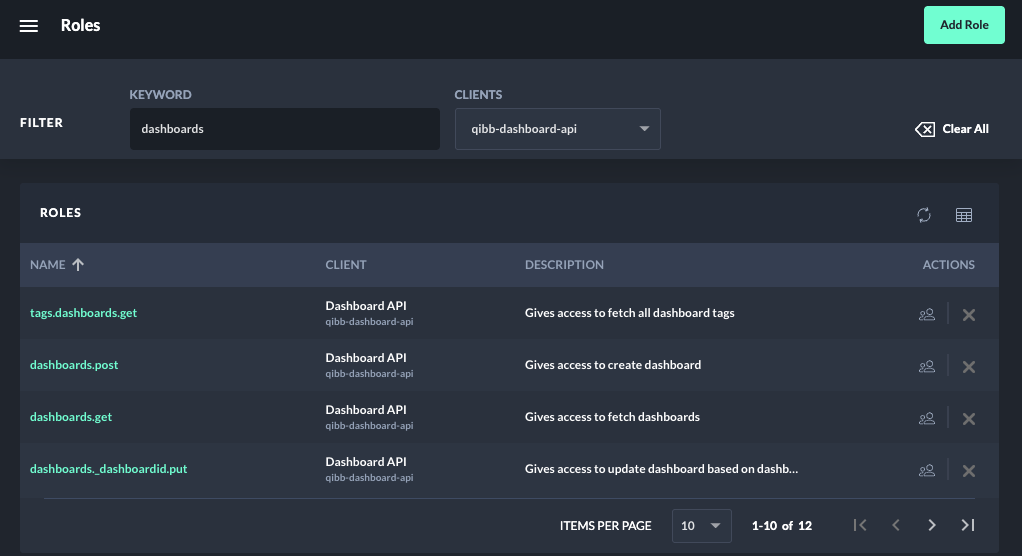
Roles for API execution follow a naming pattern closely tied to the API endpoint operation. The role name reflects of the path (e.g. /tags/dashboards) and HTTP operation (e.g., GET, POST, PUT, DELETE) of the API endpoint.
For example, calling GET /v3/dashboards of the Dashboard API requires the role dashboards.get.
Examples Endpoints and Roles:
|
Endpoint |
Role |
|---|---|
|
|
|
|
|
|
|
|
|
|
|
|
|
|
|