

Introduction
The AWS Secret Manager node integrates with AWS Secrets Manager service. It automatically fetches a configured AWS secret and exposes it in the global context, so that it can be accessed throughout your flow.
-
The synchronized secret is stored under:
AWS_SECRETS -
Additional metadata is stored under:
AWS_SECRETS_METADATA -
The node can automatically synchronize secrets after saving a flow and periodically refresh them in the background.
Configuration
Place a single instance of the node into your flow. Once deployed, it will regularly sync secrets from AWS.
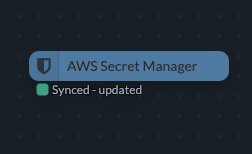
Avoid dropping multiple instances of this node. Only one instance of this node is required.
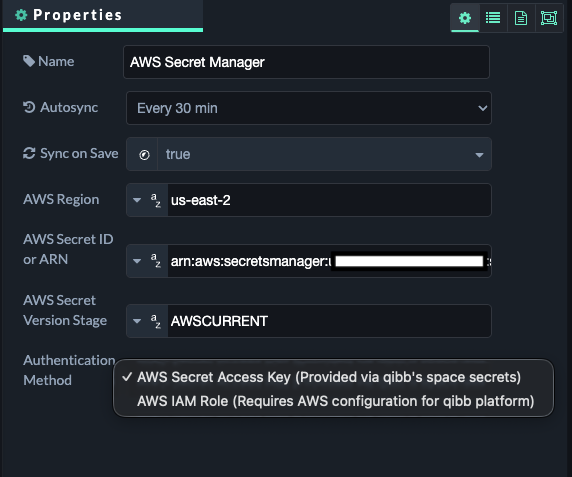
The AWS Secret Manager node offers the following configuration options:
|
Property |
Description |
|---|---|
|
Autosync |
Defines how often the secret is synchronized from AWS Secrets Manager. |
|
Sync on Save |
Defines whether the secret should be synchronized after the flow is saved or deployed. |
|
AWS Region |
The AWS region in which the secret is stored, for example |
|
AWS Secret ID or ARN |
The name or ARN of the AWS Secrets Manager secret to retrieve. |
|
AWS Secret Version Stage |
Defines the secret version stage. The default is |
|
Authentication Method |
Defines whether the node authenticates using an AWS Access Key or an IAM Role. |
Authentication
AWS Access Key
When AWS Access Key authentication is selected, the credentials must be stored in qibb's Secret Manager under:
AWS_SECRET_MANAGER_ACCESS_KEY
The secret must have the following JSON structure:
{
  "ID": "****",
  "SECRET": "****"
}
The qibb secret must already be synchronized to the flow. The node reads the credentials from:
SECRETS.AWS_SECRET_MANAGER_ACCESS_KEY.ID
and:
SECRETS.AWS_SECRET_MANAGER_ACCESS_KEY.SECRET
If the credentials are not available, the AWS secret synchronization will not start.
AWS IAM Role
ULTIMATE
This feature requires an Ultimate Subscription.
When AWS IAM Role authentication is selected, the node uses the AWS identity assigned to the qibb runtime.
No AWS Access Key is required.
The underlying infrastructure must already be configured with an IAM role or equivalent AWS workload identity that has permission to retrieve the configured secret.
-
For qibb Ultimate SaaS: qibb Support must configure this and set up an AssumeRole for cross-account permissions; request these changes via a support ticket.
-
For qibb Ultimate PaaS: qibb Support can provide scripts on request to allow the customer's platform administrator to perform this as a self-service task.
Accessing secrets from your flow
After a successful synchronization, the AWS secret is available in the global context.
For example:
const secrets = global.get("AWS_SECRETS");

const username = secrets.username;
const password = secrets.password;
If the stored AWS secret contains valid JSON, it is automatically parsed into a JavaScript object. Plain-text secrets are stored as strings.
Additional information about the synchronized AWS secret can be accessed using:
const metadata = global.get("AWS_SECRETS_METADATA");
Synchronization and retries
The node automatically refreshes the secret according to the configured Autosync interval.
If synchronization fails, the node retries automatically with a short randomized delay. After 5 consecutive failed attempts, automatic retries stop and the node reports an error status.
A successful synchronization resets the retry counter.
AWS permissions
The AWS identity used by the node requires permission to retrieve the configured secret.
Typically, the following permission is required:
secretsmanager:GetSecretValue
If the secret uses a customer-managed AWS KMS key, additional KMS permissions may be required.