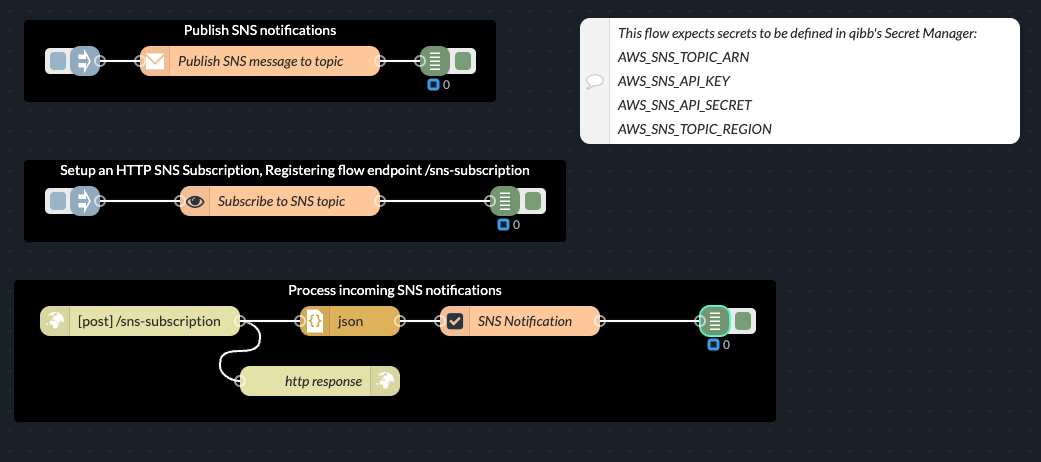
This guide is also available as a flow, which you directly import into the Flow Editor: flows_qibb_aws_sns.json
Using the function node and AWS SDK
The examples will use the function node to integrate with AWS SNS using the AWS SDK. As a prerequisite, according function nodes should have the @aws-sdk/client-sns module installed and imported as awsSdkClientSns.
Module in “Setup” tab of function node
In addition, the function node is expecting to have the following secrets stored in Space Secrets:
AWS_SNS_TOPIC_ARN
AWS_SNS_API_KEY
AWS_SNS_API_SECRET
AWS_SNS_TOPIC_REGION
Publishing SNS notifications
This example demonstrates how to publish a notification to an AWS SNS topic.
Publish SNS notification to a topic
Function Node Code Example for “Send SNS notification”
Function
Code
“On Start” Tab
Handles configuration of client on whenever the flow starts or restarts.
JavaScript
// Import required classes from the AWS SDK v3 package
const { SNSClient } = awsSdkClientSns;

// Group configuration values in an object
this.config = {
    topicArn: global.get("SECRETS.AWS_SNS_TOPIC_ARN"), // e.g., "arn:aws:sns:us-west-2:811950790052:flow-sns-test"
    accessKey: global.get("SECRETS.AWS_SNS_API_KEY"),
    accessSecret: global.get("SECRETS.AWS_SNS_API_SECRET"),
    region: global.get("SECRETS.AWS_SNS_TOPIC_REGION")
};

// Create an SNS client instance and store it as a property of the node (this.client)
this.client = new SNSClient({
    region: this.config.region,
    credentials: {
        accessKeyId: this.config.accessKey,
        secretAccessKey: this.config.accessSecret
    }
});

// Define a helper function for safely stringifying the msg (avoiding circular references)
this.removeCircular = function () {
    const seen = new WeakSet();
    return (key, value) => {
        if (typeof value === 'object' && value !== null) {
            if (seen.has(value)) {
                return undefined;
            }
            seen.add(value);
        }
        return value;
    };
};
“On Message” Tab
Uses the client to send notification and passes response to output.
JavaScript
// Import the PublishCommand from the AWS SDK v3 package
const { PublishCommand } = awsSdkClientSns;

// Retrieve the client and configuration from the node context (set in "On Setup")
const client = this.client;
const config = this.config;


async function publishNotification(){
    try {

        // Define the parameters for publishing a message
        const params = {
            Message: JSON.stringify(msg.payload),  // Convert your payload to a string
            TopicArn: config.topicArn,             // Your SNS topic ARN
            Subject: "SNS Test Notification"       // Optional: A subject line for endpoints (e.g., email)
        };

        // Create the PublishCommand using the 'new' keyword
        const command = new PublishCommand(params);

        // Send the command to SNS and await the response
        const data = await client.send(command);
        // Attach the response to msg.payload and send the message along the flow
        msg.payload = data;
        node.send(msg);
    } catch (error) {
        node.error("Error publishing message: " + error);
    }
}

// Execute the publishNotification function asynchronously
publishNotification();

// Return null since output is handled asynchronously via node.send()
return null;
Subscribe and receive SNS notifications
This example shows how to subscribe for an AWS SNS topic, setting up an HTTPS subscription pointing to an endpoint of the flow. AWS SNS will call the given endpoint immediately to confirm the subscription. Once the subscription is confirmed, AWS SNS will call this endpoint every time there is a new notification for that topic, and the flow will process the messages accordingly.
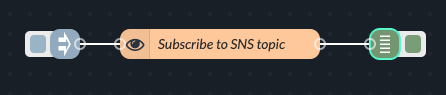
Subscribe to SNS topic
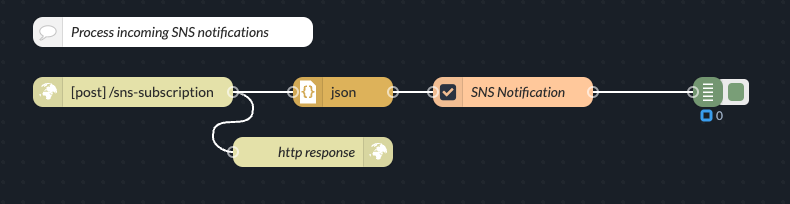
Process incoming SNS notifications
Function Node for “Subscribe to SNS topic”
Function
Code
“On Start”Tab
Handles configuration of client on whenever the flow starts or restarts.
JavaScript
// Import required classes from the AWS SDK v3 package
const { SNSClient } = awsSdkClientSns;

// Group configuration values in an object
this.config = {
    topicArn: global.get("SECRETS.AWS_SNS_TOPIC_ARN"), // e.g., "arn:aws:sns:us-west-2:811950790052:flow-sns-test"
    accessKey: global.get("SECRETS.AWS_SNS_API_KEY"),
    accessSecret: global.get("SECRETS.AWS_SNS_API_SECRET"),
    region: global.get("SECRETS.AWS_SNS_TOPIC_REGION"),
    endpointUrl: env.get("BASE_URL") + "/sns-subscription" // An opened HTTP endpoint of this flow for subscription confirmation
};

// Create an SNS client instance and store it as a property of the node (this.client)
this.client = new SNSClient({
    region: this.config.region,
    credentials: {
        accessKeyId: this.config.accessKey,
        secretAccessKey: this.config.accessSecret
    }
});
“On Message”Tab
Uses the stored client to setup a subscription for the SNS topic.
JavaScript
// Import the SubscribeCommand from the AWS SDK v3 package
const { SubscribeCommand } = awsSdkClientSns;

// Retrieve the client and config from the node context (set in "On Setup")
const client = this.client;
const config = this.config;

// Define the subscription parameters
const params = {
    TopicArn: config.topicArn,  // Your SNS topic ARN
    Protocol: "https",          // Protocol to use for the subscription
    Endpoint: config.endpointUrl // Your Node-RED endpoint URL for receiving confirmation
};

async function setupSubscription(){
    try {
        // Create the subscription command using the 'new' keyword
        const command = new SubscribeCommand(params);

        // Send the command to SNS and wait for the response
        const data = await client.send(command);
        node.log("Subscription request created successfully. Data: " + JSON.stringify(data));

        // Attach the response to msg.payload and send the message along the flow
        msg.payload = data;
        node.send(msg);
    } catch (error) {
        node.error("Error creating subscription: " + error);
    }
}

// Execute the setupSubscription function asynchronously
setupSubscription();
// Return null since output is handled asynchronously via node.send()
return null;
Function Node for “Processing SNS Notification”
Function
Code
“On Start”Tab
No code required.
“On Message”Tab
Checks the type of the incoming message. If it has the type SubscriptionConfirmation, makes an HTTP request back to AWS SNS to confirm subscription.
If it has the type Notification, it parses and passes the message to the node output.
JavaScript
//Check type of incoming SNS message
//Expects msg.payload has been parsed to JSON by another node beforehand.
switch (msg.payload.Type) {
    case "SubscriptionConfirmation":
        confirmSubscription();
        break;
    case "Notification":
        // Process and parse message
        processNotification();
        break;
}

// Function that parses and passes the notification to output
function processNotification() {
    msg.payload.Message = safeJSONParse(msg.payload.Message);
    node.send(msg);
}

// Function that calls the AWS SNS Subscribe URL to confirm subscription
async function confirmSubscription() {
    try {
        node.log("Received SubscriptionConfirmation. Confirming subscription...");
        const response = await fetch(msg.payload.SubscribeURL);
        const body = await response.text();
        node.log("Confirmed subscription.")
    } catch (error) {
        node.error("Error confirming subscription: " + error);
    }
}

// Helper function to safely parse JSON; returns original string if parsing fails
function safeJSONParse(input) {
    try {
        return JSON.parse(input);
    } catch (err) {
        return input;
    }
}

return null;