

Standard Premium ULTIMATE
Beta Feature
This feature is currently in BETA and may not be fully functional or stable. We appreciate your feedback as we improve it.
The Secret Manager plugin integrates directly with qibb’s Secret Manager, replacing the legacy Secret Manager node. It seamlessly fetches your secrets in the background and securely exposes them in your flow's global context, making it easy to access credentials, API keys, and tokens while building flows.
Legacy node deprecation (Flow App v5.3.0+)
Starting with Flow App v5.3.0, the legacy Secret Manager node is no longer needed and can be removed from your flows. The Secret Manager plugin operates entirely in the background and fully replaces the node's functionality. If the system detects a legacy Secret Manager node in your workspace, you will automatically be prompted with a message advising you to delete it.
The plugin interface is accessed via the sidebar and is divided into two main sections: Status and Secrets.
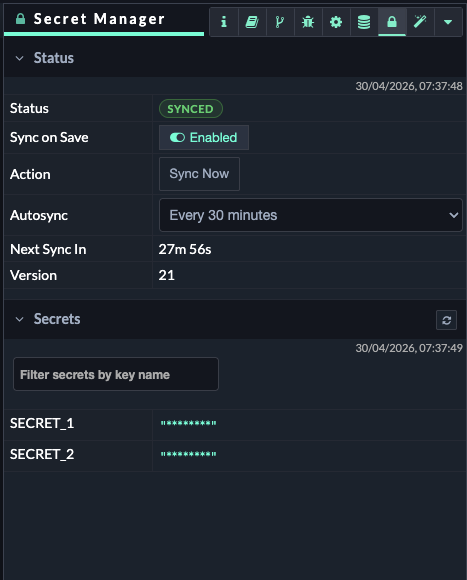
Status & sync controls
The Status section provides controls for managing how and when your Flow App synchronizes with the central Secret Manager.
-
Sync on Save: A toggle switch (Enabled / Disabled). When enabled, the plugin will automatically fetch the latest secrets every time you save your flow.
-
Sync now: A button that forces an immediate, manual synchronization of your secrets.
-
Auto Sync: A dropdown menu that allows you to define a background polling interval. The plugin will automatically check for and pull secret updates based on your selected schedule. Available options include:
-
Every minute
-
Every 30 minutes
-
Every 60 minutes
-
Every 12 hours
-
Every 24 hours
-
Secrets visualization and search
The Secrets section provides a live, read-only dashboard of the secrets currently injected and available in your Flow App's environment.
-
Search: Use the search bar to quickly look up specific secret keys and verify that they are available in your workspace.
-
Masked Values: For security and compliance, the actual values of the secrets are strictly masked. Only the keys (the names of the secrets) are visualized in the interface, ensuring sensitive data is never exposed on your screen while you work.
Accessing secrets in your flow
Space-restricted access
For security reasons, flows can only fetch secrets that belong to the specific space in which the flow is deployed.
Once the plugin has synchronized your secrets, they are immediately available in the global context.
You can reference them in your nodes (like the HTTP Request node or Function nodes) by using the standard global context path. For example, if your secret key is named my_api_token, you would access it using: global.SECRETS.my_api_token