

Standard Premium ULTIMATE
You can manually control the runtime state of flows directly from the Flow Editor. This is useful when you want to pause processing, apply changes, recover from an issue, or restart flows after updating nodes or configuration.
Before you begin
Make sure you have access to the Flow Editor and the required permissions to edit and deploy flow changes.
Open the flow controls menu
To start, stop, or restart flows:
-
Open the app.
-
Click Open Flow Editor.
-
In the Flow Editor, open the menu next to the Save button.
-
Select one of the available flow actions at the end of the menu.
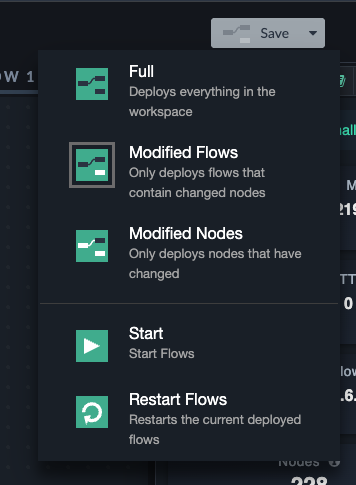
Stop flows
Use Stop to stop running flows.
Stopping flows pauses flow execution and takes the flow offline. Incoming HTTP trigger calls, such as requests to endpoints created with an HTTP In node, are no longer processed while flows are stopped.
This can be useful when you need to prevent further processing, temporarily disable exposed endpoints, investigate an issue, or prepare changes.
Start flows
Use Start to start all flows which are currently stopped (except disabled flows).
After starting flows, the app resumes processing according to the deployed flow configuration.
Restart flows
Use Restart to stop and start flows again.
Restarting flows is useful after making changes that require a runtime refresh, such as updating nodes, changing configuration, or recovering from an unexpected runtime state.
Behavior with safe mode
Flows can be manually started, stopped, and restarted regardless of whether safe mode is enabled.
Safe mode only defines the default desired state after the app boots. If an app starts in safe mode, flows remain stopped by default. Users can still use the flow controls menu to manually start, stop, or restart flows. Learn more about safe mode here: Running an app in safe mode